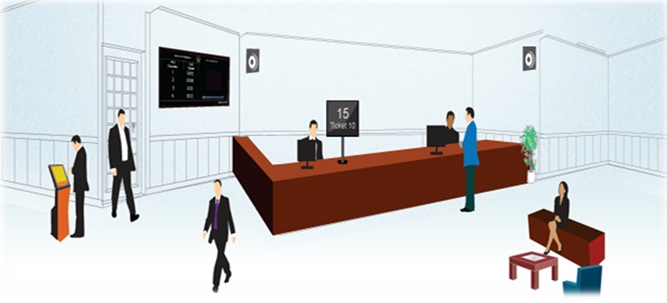
One of the most important systems nowadays is the queue management system. Since it’s hard to manage a queue manually. And when the number of services is more and more, the need for a queue management system is more.
We have developed a queue management system that fits the need of all customers, regardless the number of services, or the complexity of the service center or branch. And also, many features where added to make it easier to serve the customers.
Since the workflow in the service center or branch may vary from time to time, the queue management system should be dynamic and flexible to fit these changes, and also should be easy to be configured by the end customer.
• Counter Types (Roles):
It is so easy to define a new role in the system, and attach it to the employees. Enabling and disabling roles adds a benefit to the system from management point of view. So, depends on the structure of the service center or branch, the system can be configured.
• Transfers between Roles
Transfers between Roles can be configured depending on the structure of service center or branch. And it is easy to change and manage the way in which the transfer process occurs.
• Options and functionalities
All options and functionalities are configurable in the system, and attaching functionalities to the responsible counter is just a configuration step. And also, the options for a type of customers are also a configuration step.
• Priority
It 's a configuration steps to configure the priority of the system in which to serve the customers. E.g.: if a corporate customer is there, and the corporate counter is not available, the normal counter will serve that customer in a priority configured in the system.
• Alerts
The system allows defining alerts for cases in the system, and the alert can be either email, SMS, Pop-Up…
• Language
The options can be displayed in more than one language, default are: English / Arabic.
• Reports
The system has a reporting tool which allows the end customer to design his needed reports in addition to the system default set of reports.
SQMS is composed of the following:
? Counter display screen (LCD, 7-Sigments, Led).
This is the counter display screen that displays the current ticket number.
? Ticket Dispenser.
This is the ticket dispenser kiosk, which the customer gets the ticket from.
? Card Reader (optional).
This is a magnetic card reader installed on the ticket dispenser kiosk, used to read the magnetic card of the customer to distinguish between customer types.
? NFC Reader (optional).
This is a NFC tag reader, installed on the ticket dispenser kiosk, same as card reader, used to distinguish between customer types.
? Main display screen (LCD, 7-Sigments, Led).
This is the main screen that displays tickets numbers and related counters. In addition to display advertisements and currency exchange rates, etc…
? Virtual Keypad.
This is software application that is installed on the employee PC, by which can call for the next customer to serve, transfer customers to other counters, etc…
? Physical Keypad.
This is hardware keypad by which employee can call for the next customer to serve, transfer customers to other counters, etc…
? Multi services feature.
The system is multi services, and easy to configure, add, delete services…
? Centralized reporting system.
This is the centralized reporting system via which all reports could be generated.
? Online monitoring system.
This is the monitoring system by which responsible user can monitor the system…
? Notification system.
This is the notification system that notifies customers via SMS & email…
? Web reservation system.
This is a web based system via which customers can reserve their tickets…
? Customer type feature.
The system can be configured for customer types, Normal, VIP, Corporate…
? Mobile application feature.
The system has a mobile application feature, by which customer can reserve ticket, enquire queued customers in a specific branch…
? Template designer system.
The system that used to design the screen of the kiosk, also, the counter LCD screen…
? Arabic / English calling system.
This is the calling system which calls the current ticket number…
Main Features
? Easy to use.
? Design template screens.
? Design receipts.
? Easy integration with 3rd party systems.
? Embedded compiler (VB.NET).
? Import screens from other templates.
? Multiple services.
? Web based.
? Configurable services.
? Voice module.
? Priority enabled.
? Call next, Recall, Hold, and transfer of tickets.
Online Booking
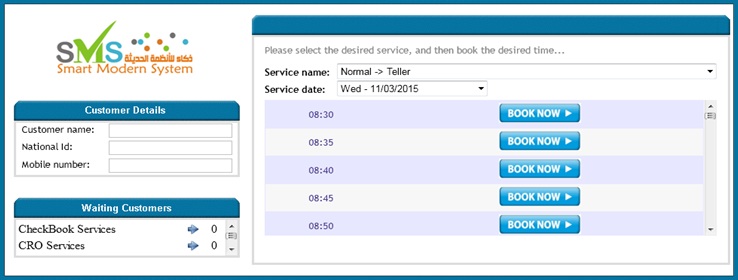
? Customer can select the desired service and date/time; the system generates a ticket that will be called on that date/time.
? Online booking could be enabled and disabled by the system administrator.
? It is configurable to allow customer to print his ticket thru the kiosk, or trust the SMS ticket.
? It is configurable to add fields that should be filled by the customer when booking thru internet.
? Customers could be able to view number of queued customers per branch.
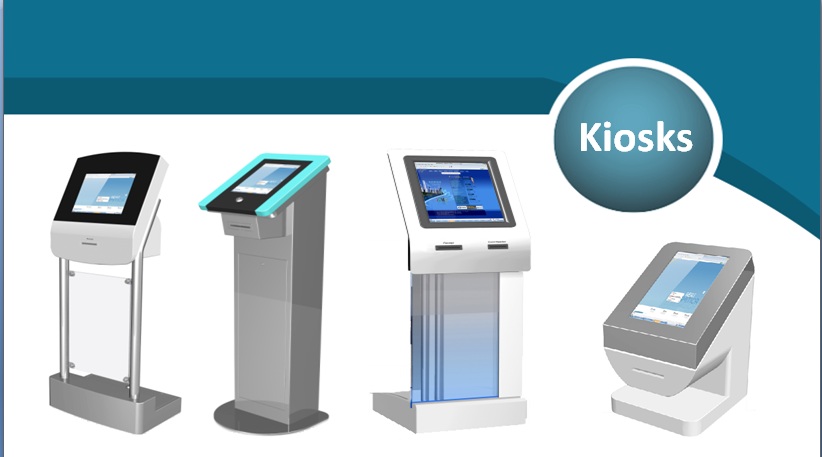
• Vertical (Portrait) monitor.
• Different monitor size: 12,15,17
• Magnetic card reader option.
• Smooth front side.
• Standard MINI PC hardware.
• Touch screen.
• Strong steel.
• 80mm thermal printer.
• Network connectivity.
• More than one design.
Architecture
• Kiosk is Ethernet connected or WI-FI.
• LCD Counter Display is Ethernet connected or WI-FI.
• LCD Main Display is Ethernet connected or WI-FI.
• Amplifier is connected to system Kiosk.
• Physical Caller terminal is WI-FI connected.
• Virtual Caller is software installed on employee PC.
• LCD Displays (Counter & Main) are Android based OS.
• Each caller has login credentials.
• Voice files could be changed and are multi-lingual.
• LCD Main display may be 2, 4 rows.
• System may have a separate LAN, or installed on the branch LAN.
• LCD Main Display may also be used for Digital Signage.
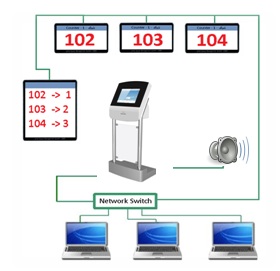
SQMS is composed of the following components:
Management System:
• Web-Based management system with all features.
• Provides Web Service for 3rd party applications access.
• Provides all reports and configuration tools.
Evaluation:
• The system has the functionality tool for evaluation.
• System admin can create questionnaires.
• Customer can evaluate the employee who served him.
• Each caller has a related evaluation device.
• Per service type, each evaluation device may display different questionnaire.
• Results could be retrieved by system admin.
Physical Terminal – Hardware:
• Wi-Fi Android terminal with the following specifications:
• Call Next Customer.
• Re-call.
• Hold.
• Mark ticket as Complete.
• Mark ticket as Absent.
• Forward ticket to another service.
• Re-call previously hold tickets.
Virtual Terminal – Software:
• This is software application that is installed on the employee PC, it is used to:
• Call Next Customer.
• Re-call.
• Hold.
• Mark ticket as Complete.
• Mark ticket as Absent.
• Forward ticket to another service.
• Re-call previously hold tickets.
LCD Counter Display:
• Vertical (Portrait) LCD Display.
• Horizontal (Landscape) LCD Display.
• Different size: 10, 14, 15.
• Multi-Lingual.
• Android-Based OS.
• Network able.
LCD Main Display:
• Vertical (Portrait) LCD Display.
• Horizontal (Landscape) LCD Display.
• Different size: 15, 19.
• Multi-Lingual.
• 2 or 5 Lines.
• Android-Based OS.
• Network able.
Queue Kiosk:
• Vertical (Portrait) monitor.
• Different monitor size: 12,15,17
• Magnetic card reader option.
• Smooth front side.
• Standard MINI PC hardware.
• Touch screen.
• Strong steel.
• 80mm thermal printer.
• Network connectivity.
• More than one design.
Template Designer:
• The system thru which the screen layout is designed.
• Easy to use.
• Design template screens.
• Many controls to use.
• Easy integration with 3rd party systems.
• Embedded compiler (VB.NET).
• Import screens from other templates.
• We can integrate our software with any 3rd party hardware.
• Distributors are needed in all countries.
• We can customize the system to fit your needs.
|